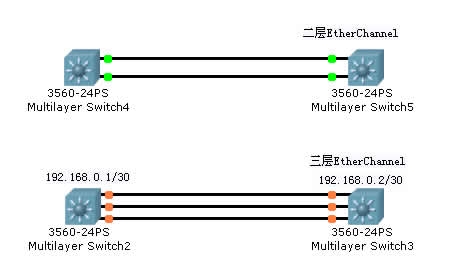
二层EtherChannel配置:
Switch(config)#int range f0/1 – 2
Switch(config-if-range)#channel-group 1 mode active
Switch(config)#int port-channel 1
Switch(config-if)#switchport mode trunk
物理口会自动继承逻辑口上的配置
interface FastEthernet0/1
channel-group 1 mode active
switchport mode trunk
注意事项:
3550上可能会出Command rejected(Packet Tracer5.3也是如此)要先封装协议,再起trunk。
Switch(config)#int f0/5
Switch(config-if)#switchport mode trunk
Command rejected: An interface whose trunk encapsulation is “Auto” can not be configured to “trunk” mode.
Switch(config-if)#switchport trunk encapsulation dot1q
Switch(config-if)#switchport mode trunk
三层EtherChannel配置:
interface range FastEthernet0/1 – 3
shutdown
no switchport
channel-group 1 mode active
interface Port-channel 1
no switchport
ip address 192.168.0.1 255.255.255.252
interface range FastEthernet0/1 – 3
no shutdown
注意事项:
shutdown 可以不用,但会弹出很多接口信息
Packet Tracer 5.3做实验时,range可能配不了channel-group单个接口进入配置即可。
删掉EtherChannel
no int po 1